LocalOne
Your private cloud, in your house.
A small home appliance you flash onto a USB stick, install to a PC, and run media, photos, AI, and backups on your own network — updated from a local dashboard, owned by you.
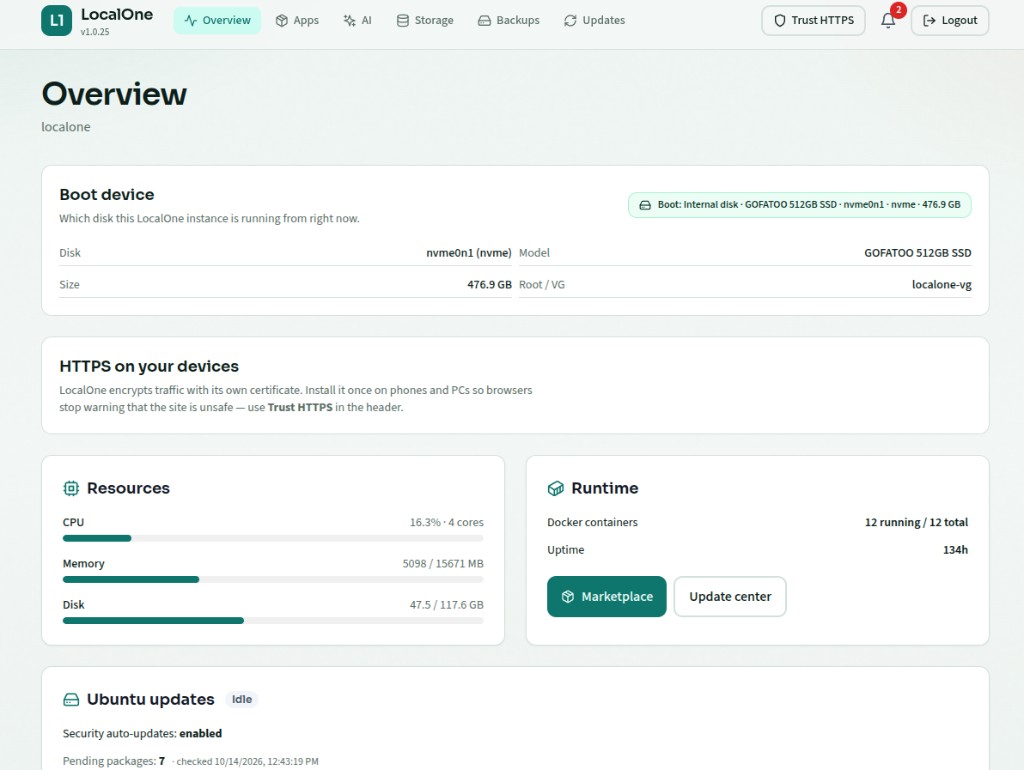
The dashboard
One local control plane for apps, AI, storage, backups, and updates. Flip through real pages from a running appliance.
Boot disk, resources, Docker, and system health in one place.
What LocalOne is
LocalOne is a personal server appliance — not a cloud account and not a pile of random Docker tutorials. You get a single Linux-based system with a web control plane: install apps from a curated marketplace, point them at folders on your disks, open them on your LAN (and optionally via HTTPS hostnames), and keep everything updated without shipping your data to someone else's datacenter.
Hardware you already have
Flash a USB image, boot an old or new PC, install to NVMe. LocalOne becomes that machine’s job.
Control plane on your LAN
One dashboard for apps, storage paths, Wi‑Fi, backups, AI, and OTA updates to LocalOne itself.
Marketplace, signed packages
Apps ship as versioned, signed install scripts from the LocalOne store — review, install, configure.
How it works
Four steps from blank stick to a running home cloud.
01
Flash
Write the LocalOne USB image to a stick (Etcher or our flash helper). That is the only block-write step.
Guide →02
Boot & setup
UEFI-boot the stick, join LocalOne-Setup Wi‑Fi, and finish onboarding in the browser.
Guide →03
Install to disk
The installer wipes the target NVMe, creates a fresh volume group, and rsyncs the live system — new UUIDs, no twin clone.
Guide →04
Apps & updates
Connect home Wi‑Fi, install marketplace apps from the dashboard, and apply control-plane OTAs when they appear.
Guide →
Some of the apps on LocalOne
A sample of what you can install from the dashboard marketplace on your appliance — not the full catalog. Open one for install steps.
Immich
MediaSelf-hosted photo and video backup — like Google Photos, on your LocalOne
How to install →IPTV Buffer
MediaBuffer and stabilize IPTV streams on your LAN
How to install →Jellyfin
MediaFree media server for your movies, TV shows, and music
How to install →Frigate
HomeLocal NVR with AI object detection for your cameras
How to install →AdGuard Home
NetworkNetwork-wide ad blocker and DNS for every device on your LAN
How to install →SearXNG
NetworkPrivate metasearch — no tracking, runs on your network
How to install →Mail Archiver
ProductivityArchive and search your email locally
How to install →Nextcloud
ProductivityFiles, calendars, and collaboration on your own hardware
How to install →Stirling PDF
ProductivityPDF tools that never leave your machine
How to install →
Built for staying local
Your disks, your paths
Apps ask for folders on the appliance (media libraries, photo libraries, backups). Data stays on hardware you control; the marketplace only delivers install packages and updates.
OTA without the cloud lock-in
The control plane checks a public store for signed system updates. You apply them from Updates in the dashboard — and can retry if the network or store URL was wrong the first time.
AI on the box (optional)
Turn on the built-in AI stack when you want local models and a chat UI — wired for tools and private search apps like SearXNG, without sending prompts to a third-party host by default.
Backups that understand LocalOne
Encrypted restic jobs for app folders and a system backup of configs, preferences, and secrets — restore reinstalls apps from the catalog and re-applies settings.